TRIB3 Heart Rate Zones Explained
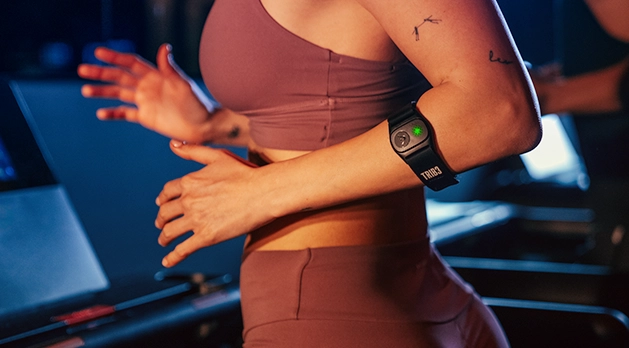
We believe fitness is about more than just numbers on a screen – it’s about keeping things serious with your strength and celebrating what your body can do every time you step into the studio.
Every workout is a chance to sweat with purpose and feel proud of your progress. One of the best ways to measure that progress is through heart rate training – because when you know your zones, you can train smarter and get the most out of every session. Heart rate tracking is bespoke to TRIB3 and a key measure that enhances both performance and progress, helping you push further while being safe and efficient.
The TRIB3 Heart Rate Zones
Our workouts are designed around three key heart rate zones, each a distinctive part of your fitness journey. These zones are displayed live on the studio screens as you train, giving you real-time feedback while wearing your heart rate monitor throughout the workout.
Here is a breakdown of each zone:
Blue Zone – PUSH (50–79% of Max HR)
This is your recovery zone – where effort stays low and your heart rate remains gentle. It’s not about building strength or endurance here; it’s about maintenance and allowing your body to reset while still moving. Think of it as active recovery that keeps you engaged without overexertion.
When you’ll see it: You may find yourself in the blue zone during the resistance work because you’re moving slower and your movements are controlled, but the overall effort isn’t high enough to drive a significant increase in heart rate. It’s a space for maintenance and recovery, not intense gains.
Golden Zone – SWEAT (80–92% of Max HR)
The SWEAT Zone isthe sweet spot for calorie burn and cardiovascular fitness. You’re working hard, feeling the heat, and pushing toward your goals. It boosts stamina, strengthens your heart, and maximizes calorie burn.
When you’ll see it: During challenging intervals and sustained effort periods. Stay in the SWEAT Zone for 15 minutes and earn your SWEAT Medal.
Red Zone – ALL OUT (93%+ of Max HR)
This Zone is where you give your maximum effort - your sprint finish, your explosive push, your moment to go all in. It increases speed, power, and metabolic rate for that afterburn effect.
When you’ll see it: Short bursts on the treadmill or on the airbikes in the Intensity Zone.
How to Wear Your Heart Rate Monitor
- Place the monitor securely on your upper forearm or just below the elbow.
- Make sure it fits snugly but comfortably - tight enough to stay in place during movement.
- Position the sensor so it’s facing inward for optimal skin contact.
Tracking Your Progress via the TRIB3 App
- Before class: Download the TRIB3 app and your monitor will be paired for real-time tracking.
- During class: Watch your Zone updates on the studio screens.
- After class: Review your stats - calories burned, SWEAT Points achieved, time in each zone, and overall performance via email and the SWEAT app.
Whether you’re powering up in the Blue PUSH Zone, driving through the Golden SWEAT Zone, or going ALL OUT in the Red Zone, every beat is a reminder of your strength and commitment to your fitness journey. This season, show yourself some love by embracing what your body can do and pushing toward your goals with purpose. Because when you train with heart, every session becomes something to celebrate.
Ready to send your heart racing and make every beat count? Explore our studios and book your next TRIB3 workout today.